

Retrieval-Augmented Generation (RAG): A Simple Guide to How RAG Works, Benefits, Pipeline, and Types
Artificial Intelligence has changed the way we search for information, create content, solve problems, and build software applications. Large Language Models (LLMs) such as ChatGPT, Gemini, and Claude can generate impressive answers, but they also have some important limitations.
One of the most useful technologies developed to solve these limitations is Retrieval-Augmented Generation (RAG).
Today, RAG is widely used in AI applications such as customer support, research assistants, enterprise search, document analysis, healthcare applications, legal systems, finance, compliance, and many other areas.
But what exactly is RAG? How does it work? Why is it so popular? What are embeddings, vector databases, chunking, retrieval, and augmentation? And what are the different types of RAG architecture?
In this article, we will explain Retrieval-Augmented Generation (RAG) in very simple English.
What Is Retrieval-Augmented Generation (RAG)?
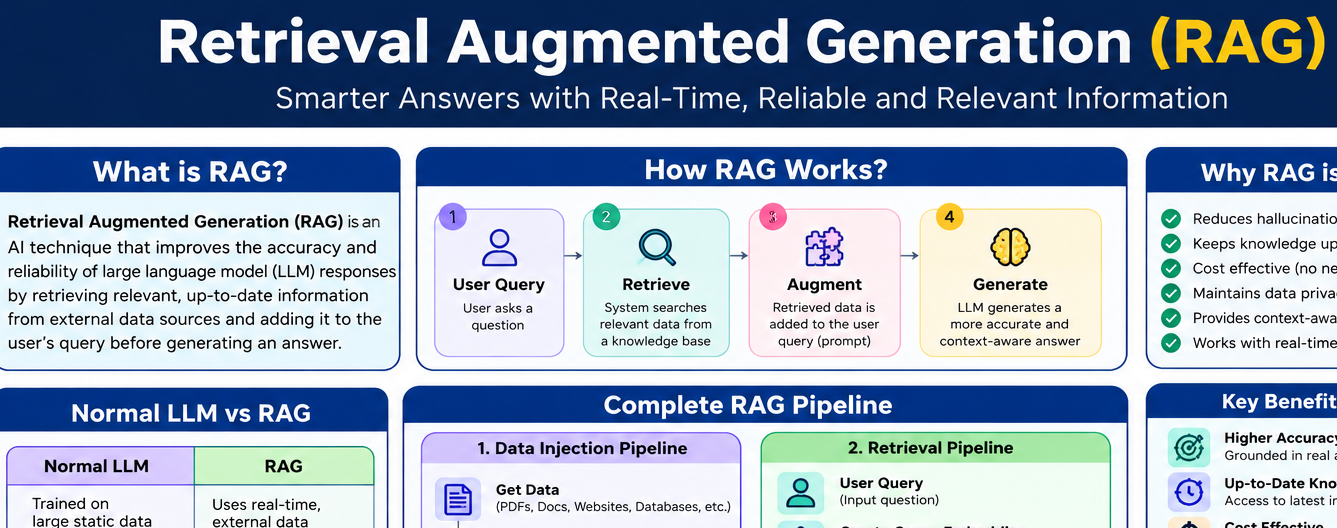
Retrieval-Augmented Generation (RAG) is an AI technique that allows a Large Language Model to use external information before generating an answer.
A normal LLM mainly depends on the information learned during its training process. RAG adds another step: it searches a connected knowledge source for relevant information and gives that information to the model as context.
In simple words:
Normal LLM:
Question → Model → Answer
RAG system:
Question → Search relevant information → Add information to prompt → Model → Answer
This makes the answer more useful because the model is not depending only on its learned knowledge.
For example, imagine an employee asks:
“What is our company’s leave policy for new employees?”
A normal public AI model may not know the company’s private leave policy.
A RAG-powered company assistant can search the company’s internal HR documents, find the relevant section, and use that information to generate an answer.
This is one reason Retrieval-Augmented Generation (RAG) has become so important in enterprise AI.
RAG Explained With a Simple Example
Imagine two students have an exam tomorrow.
Student One: Closed-Book Exam
Student One studies many books before the exam. During the exam, the student cannot access the books.
The student must answer questions using what they remember.
This is similar to how a traditional LLM works.
The model receives a question and generates an answer based mainly on the knowledge it learned during training.
Student Two: Open-Book Exam
Student Two also studies many books.
However, during the exam, the student is allowed to open the books and check information.
When a difficult question appears, the student can search the book, find the relevant information, verify it, and then answer.
This is similar to Retrieval-Augmented Generation (RAG).
The model does not need to remember every piece of information. Instead, the RAG system retrieves relevant information from an external knowledge source and gives it to the model.
This makes the system more useful for applications where the information can change or where private data is required.
Why Is RAG So Popular?
Large Language Models are powerful, but they are not perfect.
They can sometimes produce incorrect information, lack access to private company data, or fail to know newly updated information.
RAG helps solve several of these problems.
1. RAG Can Reduce Hallucinations
One major problem with LLMs is called hallucination.
An AI hallucination happens when a model produces information that sounds confident but is incorrect or unsupported.
For example, a user may ask an AI about a company’s internal policy. If the model does not have access to that policy, it may give a general answer.
With RAG, the system can first retrieve the company’s actual policy document and use that information as context.
This can make answers more grounded in the available source material.
However, RAG does not guarantee that every answer will always be correct. The quality of the retrieved information, the retrieval process, the prompt, and the model itself all matter.
2. RAG Can Use Updated Information
AI models are trained using data collected at particular points in time.
This means a model may not automatically know information that was created or updated after its training data.
RAG provides a practical solution.
Instead of retraining the complete model whenever a document changes, the application can update the external knowledge source.
For example, a company can update its product documentation, pricing information, policies, or support articles. A RAG system can retrieve the newer information when answering questions.
This makes RAG useful for information that changes frequently.
3. RAG Can Be More Cost-Effective Than Retraining
Suppose a company has thousands of documents and wants an AI assistant to use them.
One approach would be to change or retrain the model.
That can require significant time, computing resources, and engineering effort.
With RAG, the company can keep the documents outside the model and retrieve relevant sections when users ask questions.
This is one of the main practical advantages of RAG systems.
4. RAG Can Work With Private Information
Businesses often have private information such as:
- Employee policies
- Product documentation
- Customer records
- Internal procedures
- Technical manuals
- Legal documents
- Financial documents
A RAG application can be designed to retrieve only the information that a user is authorized to access.
This is important for enterprise systems.
However, privacy does not happen automatically just because a system uses RAG. Proper authentication, authorization, data security, access controls, and infrastructure design are still necessary.
How Does RAG Work?
A complete RAG system is usually explained using two major pipelines:
- Data Ingestion Pipeline
- Retrieval Pipeline
Let’s understand both in simple words.
1. Data Ingestion Pipeline
The ingestion pipeline prepares information so that the AI system can search it efficiently.
Think of this as preparing an open-book exam.
Before students can search their books, the books must be organized properly.
Step 1: Collect the Data
First, the system collects the required information.
The information can come from many sources, such as:
- PDF files
- Word documents
- Websites
- Excel files
- Text files
- Databases
- Knowledge bases
- Company documents
- Technical manuals
The exact sources depend on the application.
Step 2: Extract Useful Information
Raw files are not always ready for AI retrieval.
The system may first need to extract text, tables, metadata, or other useful information.
For example, a PDF may contain hundreds of pages, but only some sections may be relevant to a particular application.
The extracted information is then prepared for the next step.
Step 3: Split Data Into Chunks
Large documents are normally divided into smaller pieces called chunks.
Why?
Because sending an entire large document to a model for every question is inefficient.
Instead, the application can search smaller pieces and retrieve only the relevant sections.
For example:
A 100-page document can be divided into many smaller chunks.
A user asks a question.
The system searches those chunks and retrieves the ones most closely related to the question.
This is called chunking.
What Is Chunking in RAG?
Chunking is an important part of Retrieval-Augmented Generation (RAG).
If chunks are too large, they may contain too much unrelated information.
If chunks are too small, important context may be lost.
Therefore, choosing the right chunking strategy is important.
Fixed-Size Chunking
In fixed-size chunking, text is divided according to a predefined size.
For example, a system may create a new chunk after a certain number of tokens or characters.
This method is easy to implement and is often a good starting point.
However, it can sometimes split information in an unnatural place.
A sentence, paragraph, table, or important explanation could be divided between two chunks.
Hierarchical Chunking
Hierarchical chunking organizes information according to the structure of a document.
For example, the system may create chunks using:
- Sections
- Subsections
- Paragraphs
- Sentences
This approach can preserve the natural structure of the original document.
Semantic Chunking
Semantic chunking divides information according to meaning rather than only size.
For example, when the topic of a document changes, the system can create a new chunk.
This can create more meaningful pieces of information, although it may require more processing.
Popular frameworks and libraries used for building RAG applications include tools from ecosystems such as LangChain and LlamaIndex.
What Are Embeddings?
After creating chunks, the next important step is creating embeddings.
An embedding is a numerical representation of information.
AI systems work with numerical representations, so text is converted into vectors containing numbers.
For example, a sentence such as:
“How can I reset my password?”
is converted into a vector representation.
Another sentence with a similar meaning may have a vector that is mathematically close to it.
This allows the system to compare the meaning of different pieces of text.
Embedding models are available from many providers and open-source ecosystems.
Examples include OpenAI embedding models, Google embedding models, and open-source models available through platforms such as Hugging Face.
What Is a Vector Database?
Once the document chunks have been converted into embeddings, they can be stored in a vector database or another vector-search system.
A vector database is designed to store and search vector representations efficiently.
Popular technologies used for vector search include:
- Chroma
- FAISS
- Pinecone
- Elasticsearch and related search technologies
- Other vector-enabled databases
The choice depends on the application’s requirements, scale, infrastructure, and budget.
Keyword Search vs Semantic Search
Understanding the difference between keyword search and semantic search is very important for understanding RAG.
Imagine a document contains information about cardiac arrest.
Now a user searches:
“What are the symptoms of a heart attack?”
A simple keyword-based search might focus on matching the exact words in the query.
A semantic search system looks at meaning and can retrieve information that is conceptually related even when the exact words are different.
This is one of the main strengths of vector-based retrieval.
However, semantic search is not always enough. Exact terms such as product IDs, names, codes, part numbers, or technical identifiers can sometimes benefit from keyword search.
This leads to an important RAG architecture called Hybrid RAG.
The Retrieval Pipeline
After the knowledge base has been prepared, the system is ready to answer user questions.
This is where the retrieval pipeline starts.
Step 1: User Creates a Query
The user asks a question.
For example:
“What is the refund policy for my order?”
The system receives this query.
Step 2: Create a Query Embedding
The user’s query can also be converted into an embedding using the embedding model.
This allows the system to compare the query with the document embeddings.
Step 3: Retrieve Relevant Information
The system searches the vector database for chunks that are most relevant to the query.
The retrieved chunks become the context.
For example, the system may find three sections from a company’s refund policy that directly relate to the question.
Step 4: Augmentation
Now comes the “Augmented” part of Retrieval-Augmented Generation.
Instead of sending only the original question to the LLM, the system builds a prompt containing the question plus the retrieved context.
Conceptually:
Question + Relevant Context → LLM
The context gives the model useful information to work with.
Step 5: Generation
Finally, the LLM generates the answer.
The answer is returned to the user.
This explains the name:
Retrieval + Augmentation + Generation = Retrieval-Augmented Generation
The Complete RAG Pipeline
The basic process can be summarized like this:
Documents → Extraction → Chunking → Embeddings → Vector Database
Then, when the user asks a question:
User Query → Query Embedding → Retrieval → Relevant Context → Augmented Prompt → LLM → Final Answer
This pipeline forms the foundation of many RAG applications.
Popular RAG Architectures
RAG is not limited to one architecture.
Different applications require different retrieval and reasoning strategies.
1. Naive or Standard RAG
Standard RAG is the simplest approach.
The process is:
User Query → Retrieve relevant chunks → Add context → Generate answer
This architecture is relatively easy to build.
It can work well for:
- FAQs
- Simple document search
- Basic support chatbots
- Internal documentation assistants
It is a good starting point for many projects.
2. Hybrid RAG
Hybrid RAG combines different search methods, commonly semantic/vector search and keyword-based search.
This can be useful because each method has different strengths.
Semantic search is useful for finding information by meaning.
Keyword search is useful for exact terms such as:
- Product codes
- Names
- IDs
- Technical terms
- Error codes
Combining them can provide better retrieval for many enterprise applications.
3. RAG With Memory
A basic RAG system may treat every user question as a separate request.
But conversational applications often need to remember earlier parts of the conversation.
For example:
User:
“Explain our return policy.”
Then:
“Can you explain that second part in more detail?”
Without conversation history, the second question may not contain enough information.
A memory-enabled RAG application can use previous conversation context to understand what “that second part” refers to.
This can be useful for customer support and conversational assistants.
4. Graph RAG
Some knowledge bases contain many relationships between different entities.
For example, legal, financial, research, and enterprise data may contain relationships between:
- People
- Companies
- Products
- Events
- Documents
- Contracts
- Organizations
A graph can represent these entities as nodes and their relationships as edges.
Graph RAG uses graph-based information to improve retrieval and reasoning over connected knowledge.
This can be especially useful when relationships between pieces of information are important.
Graph technologies such as Neo4j can be used in systems that require knowledge-graph capabilities.
5. Agentic RAG
Some questions are too complex for one simple retrieval operation.
For example:
“Analyze the price trend of gold during 2025 and compare it with other metals.”
A system may need to:
- Break the question into smaller tasks.
- Find historical information.
- Retrieve additional information.
- Compare multiple data sources.
- Perform calculations.
- Generate a final explanation.
This is where Agentic RAG can be useful.
An agentic system can perform multiple steps and use different tools when necessary.
These tools might include:
- Search systems
- Databases
- APIs
- Calculators
- Business systems
Agentic RAG is more complex than standard RAG, but it can solve more complicated tasks.
6. Multimodal RAG
Traditional RAG often focuses mainly on text.
But real-world information can exist in many formats.
For example:
- Text
- Images
- PDFs
- Audio
- Video
- Charts
- Scanned documents
Multimodal RAG is designed to work with multiple types of information.
This can be useful in fields such as healthcare, manufacturing, research, document analysis, security, and other areas where information is not only text.
7. Self-Reflective RAG
A normal RAG system may retrieve information and immediately generate an answer.
A Self-Reflective RAG system can add another step.
It can review the draft answer and ask questions such as:
- Is the retrieved information sufficient?
- Is the answer supported?
- Is additional retrieval necessary?
- Does the response contain unsupported claims?
The system can then improve the answer before returning the final response.
This approach can be useful for research-heavy or accuracy-sensitive applications.
RAG vs Fine-Tuning
Many people confuse RAG with fine-tuning.
They are not the same thing.
Fine-Tuning
Fine-tuning changes a model’s behavior by training it further on a specialized dataset.
It is often useful for adapting a model to a certain task, format, style, or behavior.
RAG
RAG keeps external information outside the model and retrieves relevant information when needed.
For example, imagine a company has 10,000 internal documents.
With RAG, the documents can remain in an external knowledge system. When an employee asks a question, the system retrieves the relevant documents.
The model does not necessarily need to be retrained every time one document changes.
In many real-world systems, RAG and fine-tuning can also be used together.
Real-World Applications of RAG
The practical applications of Retrieval-Augmented Generation (RAG) are extremely broad.
Customer Support
A chatbot can retrieve information from product manuals, help articles, and company policies before answering customers.
Healthcare
A system can retrieve information from approved medical documents, reports, or internal resources.
Healthcare applications require strong privacy, safety, validation, and human oversight.
Legal
Law firms and legal teams can use RAG to search large collections of contracts, policies, regulations, and case-related documents.
Finance
Financial organizations can use RAG to search internal policies, reports, financial documents, and research material.
Enterprise Knowledge Search
Employees can ask questions about company processes, HR policies, technical documentation, and internal procedures.
Research
Researchers can use RAG systems to search large document collections and retrieve relevant information for analysis.
E-Commerce
RAG can help answer questions about products, specifications, returns, shipping policies, and availability by retrieving information from relevant sources.
What Makes a Good RAG System?
Building a RAG application is more than simply connecting an LLM to a vector database.
Several parts affect the final quality.
Good Data
Poor-quality documents can lead to poor answers.
Good Chunking
Chunks should contain enough information to preserve useful context without including too much irrelevant material.
Strong Embeddings
The embedding model should represent the content and queries effectively for the application’s language and domain.
Effective Retrieval
The system should retrieve the most relevant information rather than simply retrieving a large number of unrelated chunks.
Good Prompt Design
The LLM needs clear instructions about how to use the retrieved context.
Security
Users should only receive information they are authorized to access.
Evaluation
A production RAG system should be tested regularly to measure retrieval quality, factuality, relevance, latency, and other important metrics.
Challenges of RAG
Although RAG provides many benefits, it also has challenges.
Poor Retrieval
If the system retrieves the wrong chunks, the LLM may produce a poor answer.
This is why retrieval quality is extremely important.
Bad Chunking
Poorly designed chunks can break important context or combine unrelated information.
Large Context
Retrieving too much information can make prompts unnecessarily large and may introduce irrelevant content.
Data Quality
Outdated, duplicated, or incorrect documents can negatively affect the final answer.
Security Risks
Private enterprise data needs proper access control.
A RAG system should never assume that retrieval alone provides security.
Higher System Complexity
A simple LLM application may only need a model API.
A RAG application may need ingestion pipelines, embedding models, databases, retrieval logic, prompt management, access control, monitoring, and evaluation.
Why RAG Is Important for Modern AI
The biggest strength of Retrieval-Augmented Generation (RAG) is that it connects language models with external knowledge.
An LLM is very good at understanding language and generating natural responses.
A retrieval system is good at finding relevant information.
RAG combines these capabilities.
This creates applications that can answer questions using information from specific knowledge sources.
Instead of asking an AI model to know everything, we can give it access to the information it needs at the time it needs it.
That idea is simple, but it is extremely powerful.
Final Thoughts
Retrieval-Augmented Generation (RAG) has become an important technique for building practical AI applications.
It helps connect LLMs with external information sources such as documents, websites, databases, company knowledge bases, and other data systems.
The basic RAG process is easy to understand:
Collect Data → Split Into Chunks → Create Embeddings → Store Vectors → Receive Query → Retrieve Relevant Information → Add Context → Generate Answer
However, production-level RAG can become much more advanced.
Organizations may use standard RAG, hybrid RAG, memory-enabled RAG, Graph RAG, Agentic RAG, Multimodal RAG, Self-Reflective RAG, or combinations of multiple architectures.
The most important point is that RAG is not a single database, model, or tool. It is a technique and system design pattern for combining information retrieval with AI generation.
As businesses continue to use private, changing, and specialized information with AI, RAG will remain an important part of modern AI application development.
For anyone learning AI, Python, machine learning, or LLM application development, understanding Retrieval-Augmented Generation (RAG) is a valuable skill. Once you understand the basic pipeline of ingestion, chunking, embeddings, retrieval, augmentation, and generation, you have the foundation needed to start building practical RAG applications.
Table of Contents
Toggle